Bring old photos to life

Animate Old Photos

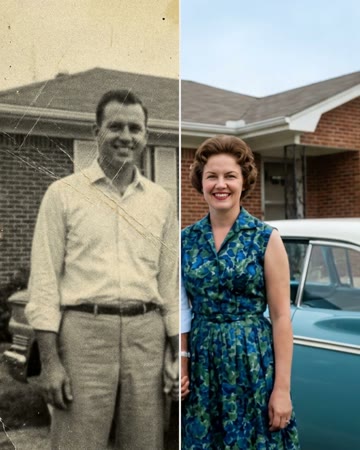
Add an old photo of someone you love and watch it come alive: a blink, a soft smile, a tilt of the head, a look into the camera, set to a gentle piano.

Updated Oct 4, 2026

Bring to Life
Grandpa
Sepia photo

The short answer

To animate old photos with AI, add one old photo, keep Bring to Life selected and tap Make the effect: in a few minutes you get a short video where the person in the picture gently moves, blinking, smiling, tilting their head and turning to the camera, while keeping their face, clothes and pose from the photo. Faded, scratched or black-and-white photos animate best after a free restoration first (3 a day on the restore old photos page). With a second photo you can also make the two of you share a hug or a slow dance. Pricing is pay-per-video: one 720p video is $8.88, three are $16.99 and ten are $29.90, with no subscription.

Make it here

Animate Old Photos

How it works on AI Rap Video: pick an effect or template below, upload your photo(s), and the clip renders in a few minutes. Pay per video from $8.88, no subscription; failed renders are refunded.

Browse all 300+ photo-to-video templates →

Bring old photos to life, from one picture

An old photo holds one moment, frozen: a grandmother at her wedding, a father in his first suit, a great-grandparent nobody alive has heard laugh. Animating old photos lets that moment breathe again. Add the photo and the Bring to Life effect makes the person in it gently move, the way they might have in the second after the shutter clicked: a blink, a soft smile, a tilt of the head, a look into the camera.

How to animate old photos

  1. Add the old photo. A scan, a digital copy, or a phone picture of the print.
  2. Keep Bring to Life selected. It is the first tile on this page; the other effects are below it.
  3. Make it. The clip is ready in a few minutes, set to a soft piano. Download it and share it with the family.

Restore first, then animate

Faded, scratched or black-and-white photos come out best when they are cleaned up first. Restore the old photo for free: it removes scratches and stains, sharpens it and adds natural color in about 20 seconds. Under the restored photo, Make it move brings it straight back here with the photo already in place.

More than a moving portrait

  • A hug. Add your own photo next to theirs for a gentle hug with a loved one who has passed away.
  • A slow dance. Choose Slow Dance for the two of you dancing together, like a father-daughter dance at a wedding.
  • For the family. A short clip for a memorial, an anniversary, a birthday or a holiday when someone is missing.

Tips for the most lifelike animation

  • Pick a clear face. A portrait works better than a tiny face in a group picture.
  • Photograph prints flat. Daylight, straight from above, no flash and no glare.
  • Restore before animating. A sharp, colorized photo gives smoother, more natural movement.
  • Only use photos you have the right to use. Your own family's photos, or with the family's blessing.
Animate old photos: questions

How do I animate an old photo?

Add the old photo, keep Bring to Life selected and tap Make the effect. In a few minutes the person in it blinks, smiles and looks at the camera in a short clip you can download and share.

Should I restore the photo first?

If it is faded, scratched, blurry or black-and-white, yes: restore it for free on the restore old photos page (3 a day), then tap Make it move under the result. A clean, sharp photo gives a far more lifelike video.

Does it work with black-and-white photos?

Yes. For a video in color, restore the photo first, which colorizes it with natural colors; the animation then follows the colors of the restored photo.

Can I animate a photo of two people?

Yes. Add one photo of both of them (One photo of both) and both come to life. Or add two separate photos and choose Hug or Slow Dance to bring the two together.

What photos work best?

A face that is clear and not too small: a portrait or a head-and-shoulders photo. For a print, take a flat, glare-free picture of it in daylight and crop away the background.

How long is the clip and what does it cost?

Pricing is pay-per-video: one 720p video is $8.88, three are $16.99 and ten are $29.90, with no subscription.

Simple pricing

Pay once — no subscription. $8.88 = 500 credits = one 720p airapvideo. 480p uses 375 credits. Packs: Single $8.88 / Popular $16.99 / Creator $29.90. Failed renders return credits when generation is live.

  • Single

    $8.88

    500 credits · one 720p rap video

    $8.88 / video

  • Best value

    Popular

    $16.99

    1500 credits · three 720p videos

    ~$5.66 / video

  • Creator

    $29.90

    5000 credits · ten 720p videos

    ~$2.99 / video

Credit packs are a one-time buy. Stripe checkout. Credits unlock Create on this page.

Secure checkout by Stripe. No subscription; a render that fails is refunded.

Animate Old Photos

One photo or two in, your clip out in a few minutes. A render that fails is refunded.