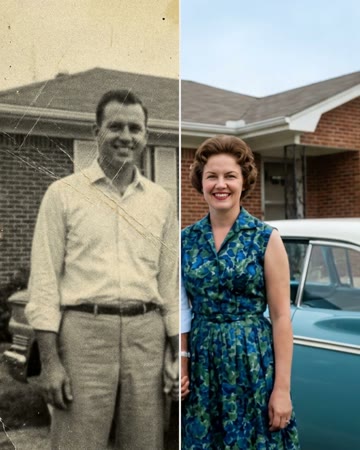
Free AI photo restoration

Restore Old Photos

Add an old, faded or damaged photo and get it back sharp and in natural color in about 20 seconds. Then, if you like, make it move, or add your own photo for a hug or a dance.

Updated Oct 4, 2026

The short answer

To restore old photos with AI, add the photo (or a phone picture of the print), tap Restore and wait about 20 seconds: the old photo restoration removes scratches, cracks, dust and stains, fixes fading and blur, and colorizes black-and-white or sepia pictures with natural colors, while keeping every face and pose as it was. It is free for 3 photos a day after signing in, and the restored photo downloads at no cost. Afterwards the same photo can go into a short video: Bring to Life makes the person blink, smile and look at the camera, and with a second photo the two of you can share a hug or a slow dance (videos use credits).

Make it here

Restore Old Photos

How it works on AI Rap Video: pick an effect or template below, upload your photo(s), and the clip renders in a few minutes. Pay per video from $8.88, no subscription; failed renders are refunded.

Browse all 300+ photo-to-video templates →

Old photo restoration in about 20 seconds

Every family has them: a wedding picture gone yellow, a grandparent's portrait with a crease across the face, a box of black-and-white snapshots nobody has looked at in years. Restoring old photos used to mean a scanner, hours of retouching or paying a studio per picture. Here the AI photo restoration does it from one photo: add it, tap Restore, and it comes back sharp, clean and in natural color, with every face kept exactly as it was.

How to restore old photos free

  1. Add the old photo. A digital copy, or a phone picture of the print taken flat, in daylight, without flash.
  2. Tap Restore photo. Sign in once (it takes a tap with Google); the restoration takes about 20 seconds.
  3. Compare and download. Drag across the photo to see before and after, then download the restored version. You can restore 3 photos a day for free.

What the AI photo restoration fixes

  • Damage: scratches, cracks, creases, dust, stains and small tears.
  • Age: fading, a yellow or sepia cast, washed-out contrast.
  • Softness: blur and grain, so faces look sharp again.
  • Color: black-and-white and sepia photos are colorized with natural skin, hair, clothes and backgrounds.
  • What it keeps: the people. Faces, expressions, poses and clothes stay as they were, only restored.

After restoring: bring old photos to life

A restored photo is a start. Under the result, three buttons take it into the video generator on this page:

  • Make it move. The Bring to Life effect (animate old photos): the person in the photo blinks, smiles softly, tilts their head and looks at the camera.
  • Hug them. Add a photo of yourself and the two of you share a gentle hug, the same as the memorial hug for a loved one who has passed away.
  • Dance together. Add your photo for a slow dance, like a father-daughter dance at a wedding.

The videos take a few minutes and use credits; the restoration itself stays free.

Tips for restoring old photos

  • Photograph the print well. Flat, in daylight, straight from above, no flash, no glare: the restoration can only work with what the camera sees.
  • One person per photo works best for videos. For a hug or a dance, crop each person from a group picture.
  • Restore before you animate. A sharp, colorized photo gives a far more lifelike video than a faded one.
  • Keep the original. The restored copy is a new file; your original photo is not changed.

More ways to remember someone

Make a gentle AI hug with a deceased loved one, a warm AI hug with anyone close to you, or see all AI video effects.

Restore old photos: questions

How do I restore an old photo with AI?

Add the photo at the top of this page and tap Restore photo. In about 20 seconds the restored version appears next to the original; drag across it to compare, then download it.

Is the old photo restoration really free?

Yes. After signing in, you can restore 3 photos a day for free and download them with no watermark. Only the videos made afterwards (making the photo move, a hug, a dance) use credits.

What does the restoration fix?

Scratches, cracks, creases, dust spots, stains and small tears, plus fading, a yellow or sepia cast, blur and noise. Black-and-white photos come back in natural color. Faces, poses, hair and clothes stay as they were.

I only have the printed photo. How do I scan it?

Lay the print flat by a window in daylight and take a picture straight from above with your phone, without flash and without glare. Crop away the table, then add that picture here.

Can it fix a photo with a large missing piece?

Small tears and missing corners are usually filled in well. When a big part of a face is gone, the AI has to imagine it, so the result may not look exactly like the person; a second photo of them often works better.

Can I make the restored photo move?

Yes. Under the restored photo, tap Make it move and it goes into the video generator on this page with the Bring to Life effect: the person blinks, smiles and looks at the camera. Hug them or Dance together adds your own photo next to theirs.

What happens to my photos?

They are stored so you can download them and use them in a video, and are never shown to anyone else. Please only restore photos of your own family or photos you have the right to use.

Simple pricing

Pay once — no subscription. $8.88 = 500 credits = one 720p airapvideo. 480p uses 375 credits. Packs: Single $8.88 / Popular $16.99 / Creator $29.90. Failed renders return credits when generation is live.

  • Single

    $8.88

    500 credits · one 720p rap video

    $8.88 / video

  • Best value

    Popular

    $16.99

    1500 credits · three 720p videos

    ~$5.66 / video

  • Creator

    $29.90

    5000 credits · ten 720p videos

    ~$2.99 / video

Credit packs are a one-time buy. Stripe checkout. Credits unlock Create on this page.

Secure checkout by Stripe. No subscription; a render that fails is refunded.

Restore Old Photos

One photo or two in, your clip out in a few minutes. A render that fails is refunded.